
No products in the cart.
Welcome to New Stuff Friday, where we show off a smattering of the latest inventory we’ve brought in. How is this different from a usual Friday at Solarbotics? We’ve moved our other news/announcements to other days of the week (such as Project Monday and Cool Links Wednesday), so you just get the goods on the goods.
…Except for this week, where we have a (short) piece of news to also cram in. Canadian prices are now par with American prices. That’s right fellow Canucks – with a few exceptions (such as Phidgets and Matrix Orbital inventory), the pricing across all of our catalogue is now the same in both USD and CAD.
And now on with the show:
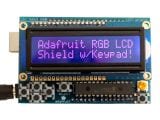 |
Adafruit RGB LCD Shield Kit with 16×2 Character Display – Negative $24.95 This new Adafruit shield makes it easy to use a 16×2 Character LCD. This one features the negative display (colored text on dark background) |
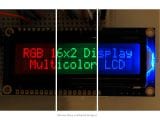 |
Adafruit RGB LCD 16×2 Character Display – Negative (RGB text on dark) $13.95 This is a fancy upgrade to standard 16×2 LCDs – instead of just having blue and white (or red and black), this LCD has full color RGB characters on a dark background! That means you can change the character display colors to anything of the following: Red, green, blue, pink, white, purple yellow, teal, salmon, chartreuse. This LCD looks strikingly good in person. |
 |
SparkFun Pro Micro – 5V/16MHz Leonardo-lookalike $24.95 The Pro Micro is similar to the Arduino Pro Mini except with an ATmega32U4 on board. The USB transceiver inside the 32U4 allows us to add USB connectivity on-board and do away with bulky external USB interface. |
|
Micromega uM-FPU64 64-bit Floating Point Coprocessor $24.95 Not wimpy 16-bit, or even anemic 32-bit – this match chip does 64-bit math while expanding the I/O capabilities of your design. |
|
LilyPad Accelerometer ADXL335 $24.95 This is a three axis accelerometer for the LilyPad system. Based on the ADXL335 accelerometer from Analog Devices, the LilyPad Accelerometer can detect joint movement as well as inclination and vibration. |
|
LilyPad Coin Cell Battery Holder $4.95 If you’re looking for a simple way to add a battery to your LilyPad project, the LilyPad Coin Cell Battery Holder might do the trick. |
|
LilyPad Arduino Simple Board $19.95 This is the LilyPad Arduino Simple Board. It’s controlled by an ATmega328 with the Arduino bootloader. It has fewer pins than the LilyPad Arduino Main Board, a built in power supply socket, and an on/off switch. |
|
LilyPad LED PCB Set $4.95 These boards allow you to use your own 5mm LED as a LilyPad LED. |
|
LilyPad Battery Connect $2.95 The LilyPad Battery Connect simply gives you a connection point for a battery or anything else you might want to plug in to your LilyPad system. It consists of a single 2-pin JST connector on a small LilyPad board with positive and negative terminals. |
And that pretty much wraps up our first week with our new newspost format. Like it? Hate it? Rather ambivalent? Let us know! We’re glad to take whatever feedback we can get. Now if you’ll excuse us, there appears to be green stuff coming out of the ground, a bright thing shining down, and the sky is an alarmingly attractive shade of blue. It’s a big improvement over last weekend, what with it’s wide variety of Snow and Other Snow. We’ll see you all on Monday with new project post!
The Googles tell us that ‘synapse’ is defined as “a junction between two nerve cells, consisting of a minute gap across which impulses pass by diffusion of a neurotransmitter.” This, however, is one of the rare instances where The Googles are wrong, because what Synapse actually is (according to Jeremie, our tech guy) are RF engines that possess a 3 mile line of sight outdoor transmission range and 1000ft indoor transmission range (as opposed to Synapes, which is a synchronized swimming team formed from a family of larger primates). You’re probably thinking that XBee is a pretty great wireless communications system with lots of support, and you’d be right. Synapse Wireless is just as great, though, and has longer range at really affordable pricing. Plus, they were used for remotely controlling the costume lighting in Tron Legacy, which adds, like, at least 50 cool points.
One of the problems of using Synapse Wireless modules, however, is that they don’t quite have the catalogue of accessories and add-ons (like XBee modules have) to make them easy to use. Well, you’re in luck – Solarbotics is here to make them more usable and accessible with two new kits and some documentation to match. If you’re more of a visual person, check out this three part video for a rundown of what these modules are, how they work, and what you can do with them:
“That looks cool,” you proclaim, “but I need some kinda step-by step written documentation so that I can follow along at my own speed.” Well, we got you covered. Here are two helpful tutorials we wrote up to help you :
- Steps for Wirelessly Programming an Arduino (pdf)
- Getting Around the Optiboot Bootloader (pdf)
- Snappyscripts for Wirelessly Programming the UNO (sample code, for use with Arduino1, will not work with Arduino-0022)
Hrm, we should probably show you the nifty new kits you’ll need, shouldn’t we?
|
|
| Solarbotics Synapse-to-FTDI Adapter Kit Want a board that can breakout the Synapse RF module pins, gives you a USB port/FTDI chip to program, supplies it with a regulated 3.3V, integrates a reset switch (for updating & erasing), and also gives you mounting options? Well the Solarbotics Synapse-to-FTDI Adapter Kit can do it all. |
Solarbotics Synapse-XBee Adapter Kit If you want to use Synapse modules in an XBee application, this will let you adapt it to work. With a few extra parts, you can even go back the other way (Xbee modules for Synapse setups). |
We have a full run-down of all the Synapse items we carry, along with most of the information in this post, which can be found right here.
But wait, THERE’S MORE. Well, completely unrelated, but more nonetheless. We’re doing a bit of very late spring cleaning (or very early, depending on how you want to look at it), and it turns out we have a few items that we’d like to clear out of our inventory. Today we’re starting off with the following LCD modules and accessories from Matrix Orbital:
- LK202-24-USB-R USB LCD Module
- LK202-25 Serial LCD Module
- LK204-25-GW-VPT Serial LCD Module
- MX-212 USB Drive Bay Kit USB-WB-BK
- LK202-25-WB Serial LCD Module
- Black 15-Button Keypad Overlay
- MK2021-AL Mounting Kit for 20×2 LCD – Brushed Aluminum
We’ll keep putting items on discount over the next week, so keep an eye on the Clearance category. That’s it for now. Keep in mind that we’ll be closed to celebrate Canadian Thanksgiving on October 10th. It’s still just over a week away, so we’ll give you another heads-up next week.